|
|
||
|---|---|---|
| .. | ||
| AssemblyLoader.cs | ||
| Catswords.Phantomizer.csproj | ||
| LICENSE | ||
| README.md | ||

Catswords.Phantomizer
Catswords.Phantomizer is an HTTP-based dynamic-link library (DLL) loader designed for .NET applications. It allows your application to fetch and load assemblies directly from your CDN (Azure Blob, S3, Cloudflare R2, etc.) at runtime, with optional GZip compression support.
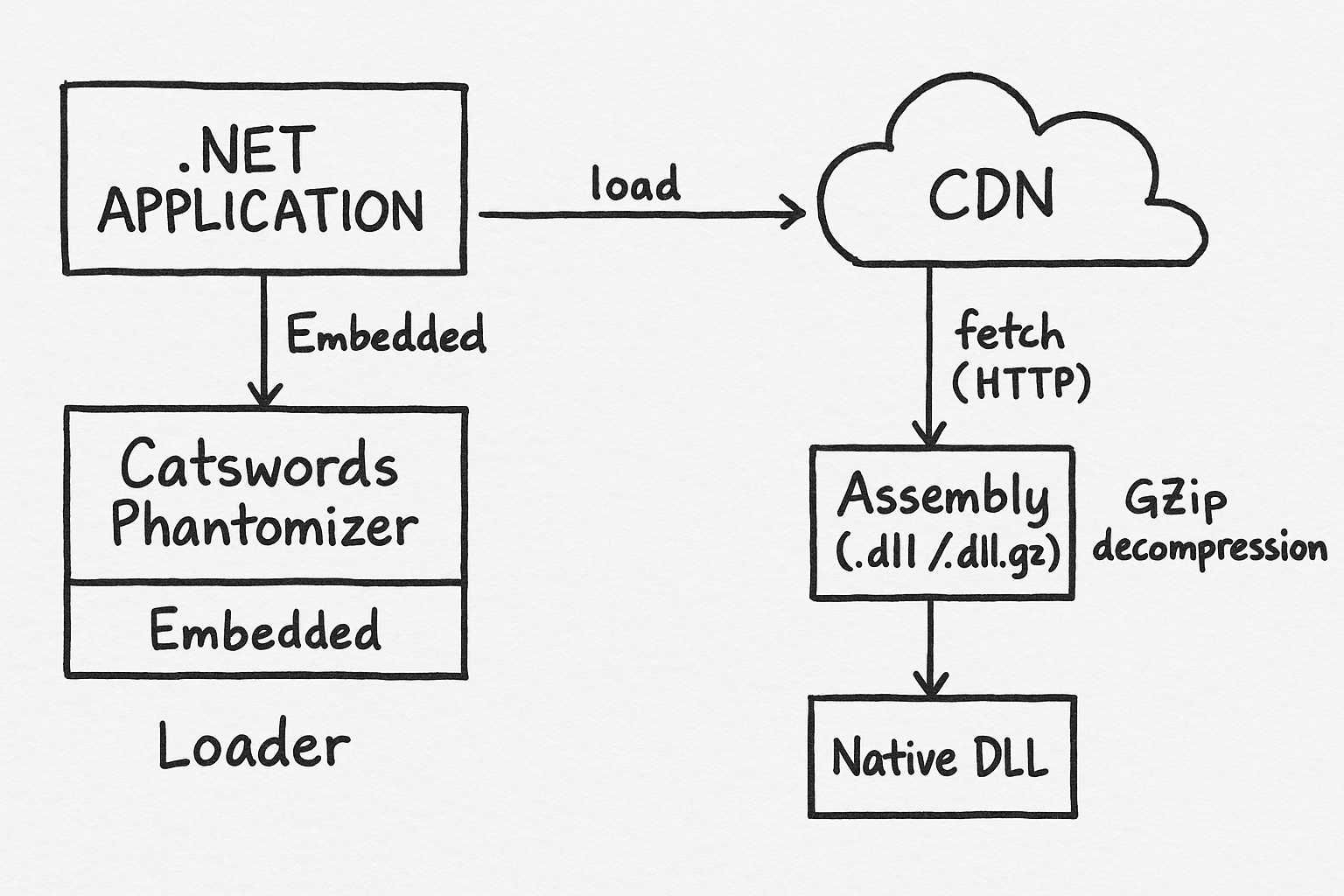
🚀 Features
- Load managed (
*.dll) and native (*.dll) assemblies over HTTPS only - Optional
.dll.gzdecompression for faster network delivery - CDN-friendly URL structure
- Easy bootstrap through a small embedded loader
- Loader is implemented using pure .NET BCL only without external dependencies (.NET Fx/Core fully supported)
- Built-in code-signing verification support to ensure assemblies are trusted and tamper-free
- An efficient integrity verification process based on an integrity manifest (NFT-grade immutability)
📦 How to Use
1. Embed Phantomizer into your project
You can include Catswords.Phantomizer in your project using one of the following methods:
| Method | Description | When to Use | Setup Steps |
|---|---|---|---|
| Resources.resx Embedded File | Stores Catswords.Phantomizer.dll.gz inside Resources.resx and loads it at runtime. |
Recommended when you want the loader fully self-contained inside your executable. | Add file to Resources.resx → Access via Properties.Resources.Phantomizer. |
| Embedded Resource | Embeds Catswords.Phantomizer.dll.gz directly into the assembly manifest (outside of resx). |
Useful when you prefer not to maintain .resx files but still want Phantomizer embedded. |
Add file to project → Set Build Action = Embedded Resource → Load via GetManifestResourceStream(). |
| Normal Assembly Reference (no embedding) | References Catswords.Phantomizer.dll normally through project references. |
Use this when you distribute Phantomizer as a standalone DLL instead of embedding it. | Add Phantomizer DLL to your project references → using Catswords.Phantomizer;. |
2. Initialize Phantomizer at application startup
Place the following code inside your Main method, static constructor, or any early entry point:
static Program() {
    InitializeAssemblyLoader();
}

private static void InitializeAssemblyLoader()
{
    /*
    // Example for Embedded Resource:
    var asm = Assembly.GetExecutingAssembly();
    using (var stream = asm.GetManifestResourceStream(typeof(Program).Namespace + ".Resources.Catswords.Phantomizer.dll.gz"))
    {
        // decompress and load...
    }
    */

    byte[] gzBytes = Properties.Resources.Phantomizer;

    byte[] dllBytes;
    using (var input = new MemoryStream(gzBytes))
    using (var gz = new GZipStream(input, CompressionMode.Decompress))
    using (var output = new MemoryStream())
    {
        gz.CopyTo(output);
        dllBytes = output.ToArray();
    }

    Assembly phantomAsm = Assembly.Load(dllBytes);
    Type loaderType = phantomAsm.GetType("Catswords.Phantomizer.AssemblyLoader", true);

    loaderType.GetProperty("BaseUrl")?.SetValue(null, GetAppConfig("AssemblyBaseUrl"));  // Set the CDN base URL
    //loaderType.GetProperty("IntegrityUrl")?.SetValue(null, GetAppConfig("IntegrityUrl"));  // (Optional) Set the integrity URL
    loaderType.GetProperty("LoaderNamespace")?.SetValue(null, typeof(Program).Namespace);
    loaderType.GetProperty("AppName")?.SetValue(null, "WelsonJS");                       // Application name
    loaderType.GetMethod("Register")?.Invoke(null, null);

    var loadNativeModulesMethod = loaderType.GetMethod(
        "LoadNativeModules",
        BindingFlags.Public | BindingFlags.Static,
        binder: null,
        types: new[] { typeof(string), typeof(Version), typeof(string[]) },
        modifiers: null
    );

    if (loadNativeModulesMethod == null)
        throw new InvalidOperationException("LoadNativeModules(string, Version, string[]) method not found.");

    loadNativeModulesMethod.Invoke(null, new object[]
    {
        "ChakraCore",
        new Version(1, 13, 0, 0),
        new[] { "ChakraCore.dll" }
    });
}
If embedding is not required, you can reference Phantomizer directly:
using Catswords.Phantomizer;

static void Main(string[] args)
{
    AssemblyLoader.BaseUrl = GetAppConfig("AssemblyBaseUrl");   // Configure CDN base URL
    //AssemblyLoader.IntegrityUrl  // (Optional) Set the integrity URL
    AssemblyLoader.LoaderNamespace = typeof(Program).Namespace;
    AssemblyLoader.AppName = "WelsonJS";
    AssemblyLoader.Register();

    AssemblyLoader.LoadNativeModules(
        "ChakraCore",
        new Version(1, 13, 0, 0),
        new[] { "ChakraCore.dll" }
    );
}
3. Upload your DLL files to a CDN
Upload your managed and native assemblies to your CDN following the URL pattern below.
📁 URL Rules
| Type | Example URL | Description |
|---|---|---|
| Managed DLL | https://example.cdn.tld/packages/managed/MyManagedLib/1.0.0.0/MyManagedLib.dll |
Normal .NET assembly |
| Managed DLL (GZip) | https://example.cdn.tld/packages/managed/MyManagedLib/1.0.0.0/MyManagedLib.dll.gz |
GZip-compressed .NET assembly |
| Native DLL | https://example.cdn.tld/packages/native/MyNativeLib/1.0.0.0/MyNativeLib.dll |
Native assembly |
| Native DLL (GZip) | https://example.cdn.tld/packages/native/MyNativeLib/1.0.0.0/MyNativeLib.dll.gz |
GZip-compressed native assembly |
4. 🎉 Start loading assemblies over HTTP
Once Phantomizer is initialized, your application will automatically fetch missing assemblies from your CDN.
📥 Download the pre-compiled file
🛡 Integrity Manifest (Integrity URL)
Phantomizer can verify assemblies before loading them by downloading an integrity manifest (XML).
You can host this integrity file anywhere — preferably separate from your main CDN, to prevent tampering and ensure independent verification of assembly integrity.
🔒 Why separate Integrity URL and main CDN?
Separating them prevents a compromised CDN bucket from serving malicious DLLs and falsifying the integrity file. Phantomizer can trust the integrity manifest, even if the main CDN is partially compromised.
✔ Recommended: Filebase (IPFS-pinning, NFT-grade immutability)
Filebase provides immutable IPFS-based storage, which is widely used in blockchain ecosystems — including NFT metadata storage — due to its strong guarantees of content-addressing and tamper resistance. Once uploaded and pinned, the file cannot be silently modified without changing its IPFS hash (CID), making it ideal for hosting integrity manifests.
👉 Recommended signup (with pinning support): Filebase
✔ Integrity Manifest Example (from integrity.xml)
<AssemblyIntegrity schemaVersion="1" generatedAt="2025-12-10T00:00:00Z">
  <Hashes>
    <Hash
      value="b43b1019451c5bdacb5ed993c94e1d3b"
      algorithm="MD5"
      assemblyName="ChakraCore"
      assemblyType="native"
      version="1.13.0.0"
      platform="x86"
      compression="none"
      fileName="ChakraCore.dll" />

    <Hash
      value="5e274b47fc60c74159b4d1e21e70c0edf8e0936bdabc46b632525d09ca2fbae8"
      algorithm="SHA256"
      assemblyName="ChakraCore"
      assemblyType="native"
      version="1.13.0.0"
      platform="x86"
      compression="none"
      fileName="ChakraCore.dll" />

    <!-- ... more entries ... -->
  </Hashes>
</AssemblyIntegrity>
Report abuse
Join the community
I am always open. Collaboration, opportunities, and community activities are all welcome.